

You create an OpenAI API key in the dashboard, on the
API keys page. OpenAI's quickstart then
has you export it as OPENAI_API_KEY, and the official Python and Node.js SDKs read that variable
on their own when you don't pass a key. That default is handy, and it is also why the key
ends up in your shell profile or a .env file. This post covers getting the key,
why a key can stop working, and how to keep it in an encrypted Valt0 vault instead.
Get the key
Sign in to the OpenAI platform, open API keys and create a key. OpenAI's quickstart says to store it "in a safe location, like a .zshrc file or another text file on your computer", and its API reference puts it plainly: your API key is a secret. A text file is the part this post changes.
Make one key per app or project rather than one for everything. OpenAI's help center points out that you can track usage by API key, so separate keys make it easy to see which app made which calls, and to delete one without breaking the others.
Where the SDK looks for it
The quickstart sets the key in your terminal. On macOS or Linux:
export OPENAI_API_KEY="your_api_key_here"On Windows, in PowerShell:
setx OPENAI_API_KEY "your_api_key_here"
setx only reaches windows opened after it, so open a new PowerShell window
before you run the app.
Then the client finds it without being told. In Python, OpenAI() with no
arguments reads OPENAI_API_KEY:
from openai import OpenAI

client = OpenAI()  # reads OPENAI_API_KEY

response = client.responses.create(
    model="gpt-6-astra",
    input="Say hello in five words.",
)
print(response.output_text)
And in Node.js, new OpenAI() does the same:
import OpenAI from 'openai';

const client = new OpenAI(); // reads OPENAI_API_KEY
If you'd rather not export it in every terminal, the Python SDK's README recommends
python-dotenv and a line in .env, so the key stays out of source control.
A key that worked yesterday
OpenAI's help center says that when it detects an API key on the public internet, it
disables that key immediately. If you pushed a .env to a public repository, or
pasted the key somewhere public, that is the likely reason. Deleting the line in a later
commit doesn't bring it back: create a new key and keep the new one out of the repository.
If a request fails with a key you are sure is fine, check which one the SDK actually picked up. These print the variable names and the files that mention the key, not the key itself, so it doesn't land on your screen:
env | grep '^OPENAI_' | cut -d= -f1
grep -l 'OPENAI_API_KEY' ~/.zshrc ~/.zprofile ~/.bashrc ~/.bash_profile ~/.profile 2>/dev/null
An old export in a profile you forgot about will win over the
.env you just edited, because python-dotenv doesn't overwrite a variable that is
already set unless you pass override=True.
Where the key ends up
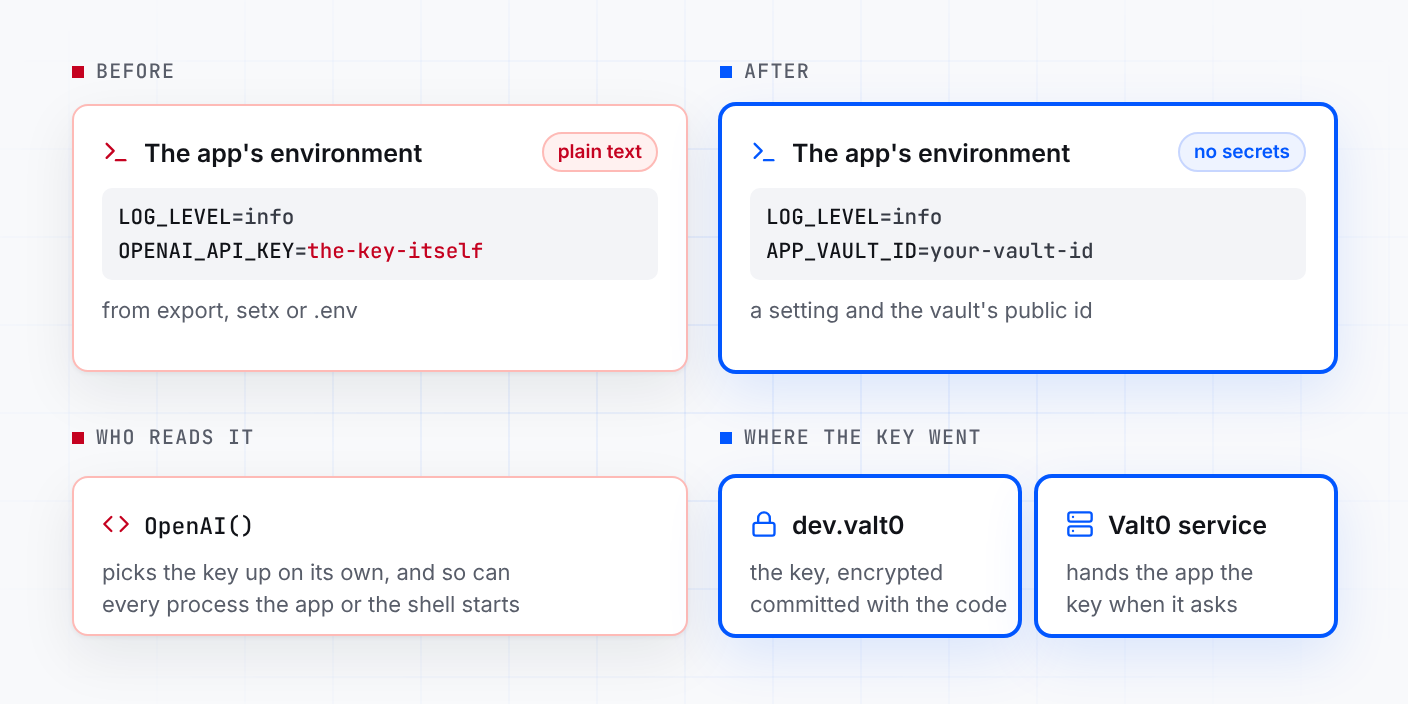
Followed to the letter, the setup leaves the key in plain text in a file:
LOG_LEVEL=info
OPENAI_API_KEY=the-key-itself
Or in ~/.zshrc as an export line. On Windows, setx
saves it in your user environment, and every terminal you open afterwards, and every program
it starts, gets it. Anything that can read the file can use the key: a backup, a copy sent to a
teammate, a tool or coding agent working in the project folder. And a variable in the
environment is handed down to every process the app or the shell starts. OpenAI's help
center warns that a leaked key lets someone use the API on your account, with the charges
landing on you.
Keep the key in a vault
You need Valt0 installed; valt0 status checks
that its service is running. Create a vault for development. Valt0 prints its key once, so
put it in your password manager now: without it nobody can open the vault, you included.
valt0 init devStore the OpenAI key under the same name. Valt0 asks for the vault key, then for the value: paste the OpenAI key.
valt0 store dev:OPENAI_API_KEYThe app never sees the vault key. It opens the vault by its id, which is public, and asks the local Valt0 service for the secret by name. Print the id:
valt0 info devPut that id in .env where the key was. It is safe there:
LOG_LEVEL=info
APP_VAULT_ID=your-vault-id
Commit dev.valt0 with the code. Without the vault key it can't be read.
Then remove the old copies. Take the export OPENAI_API_KEY line out of your
shell profile and open a new terminal. On Windows, delete OPENAI_API_KEY in the
Environment Variables window (search the Start menu for "Edit environment variables for your
account") and open a new PowerShell window. Otherwise the key is still in plain text there,
and still in the environment of everything you run.
Python
Install the clients. Valt0's needs Python 3.9 or later; the current openai and
python-dotenv need 3.10, so use 3.10 or later. python-dotenv keeps reading the settings in
.env:
python -m pip install valt0-client openai python-dotenvThen pass the key to OpenAI yourself, from the vault:
import os

import valt0
from dotenv import load_dotenv
from openai import OpenAI

load_dotenv()

vault = valt0.open_vault(id=os.environ["APP_VAULT_ID"], name="app")

with vault.secret("OPENAI_API_KEY") as secret:
    client = OpenAI(api_key=secret.reveal())

response = client.responses.create(
    model="gpt-6-astra",
    input="Say hello in five words.",
)
print(response.output_text)
reveal() hands the SDK the value, and the with block wipes
Valt0's copy when it ends. The SDK keeps the string it was given, because a Python string
can't be wiped, but the key is no longer in the environment or in a file next to your
code. Anywhere else, the secret prints as [REDACTED]: in
print(), an f-string or a log line. If the service can't be reached,
open_vault raises an error and the app stops at startup.
Get your Python secrets out of .env walks through
the same steps for a database URL and more, and fixes the "No module named 'dotenv'" error
on the way.
Node.js
npm install @valt0/client openaiimport OpenAI from 'openai';
import { openVault } from '@valt0/client';
const vault = await openVault({ id: process.env.APP_VAULT_ID, name: 'app' });
const apiKey = await vault.secret('OPENAI_API_KEY');
export const client = new OpenAI({ apiKey: apiKey.reveal() });
apiKey.destroy();
destroy() wipes Valt0's copy straight after. The SDK keeps the string it was
given, because a JavaScript string can't be wiped, but the key is no longer in
process.env or in any file next to your code. Valt0's client needs Node.js 20
or later; the current openai package needs Node.js 22, so use 22 or later. To
get APP_VAULT_ID from .env, start the app with
node --env-file=.env app.mjs.
From here
-
If the key may have leaked, create a new key on the API keys page, store
it with
valt0 store dev:OPENAI_API_KEY --forceand restart the app, then delete the old key. Check usage for that key for calls you didn't make. -
Teammates get
dev.valt0when they clone the repo and the vault key from you. They runvalt0 import devonce before the app can read it. -
Keep it out of browser code. OpenAI's API reference says never to expose
the key in client-side code such as browsers or apps, and the Node.js SDK refuses to run
in a browser unless you set
dangerouslyAllowBrowser. Call OpenAI from your server and have the browser talk to that. -
Production gets its own vault and its own OpenAI key, with the same
secret name, so a leaked
devkey leaves it alone. Deployment covers servers.
Other secrets in the same .env go the same way:
Turn an .env file into a vault converts a whole file in one
step, Get your Node.js secrets out of .env covers a
database and Stripe, and
the Gemini version of this post does the same
for a Google key.
Sources: OpenAI quickstart, OpenAI API reference: authentication, OpenAI help center: keeping your account secure, openai for Python, openai for Node.js, python-dotenv, Microsoft: setx, Valt0 Python client docs, Valt0 Node.js client docs.