

ModuleNotFoundError: No module named 'dotenv' means the Python running your
script can't find python-dotenv. Install it under its real name, with the same Python that
runs the script, and the error goes away. Then look at what load_dotenv() is
loading: if it is passwords and API keys in plain text, this post moves them into an
encrypted Valt0 vault in a few minutes.
Fix the error
The package is called python-dotenv on PyPI, but your code imports it as
dotenv. So the import is right, and the usual problem is where the package went.
A plain pip can belong to another Python than the one running your script, such
as the system's while your project has a virtual environment. python -m pip runs
pip with the interpreter you name, so the package lands where that interpreter will look.
Activate the project's virtual environment first, then install it by its real name:
python -m pip install python-dotenv
With the environment active, py -m pip does the same on Windows. Skip
pip install dotenv: that name is an empty package, marked deprecated on PyPI,
whose only job is to pull in python-dotenv.
To check, ask the same Python to import it. It prints where the package came from, or the same error:
python -c "import dotenv; print(dotenv.__file__)"Import "dotenv" could not be resolved
That one comes from Pylance, the Python language server in VS Code, and it usually means the editor is pointed at another interpreter than the one you installed into. The script may even run fine from the terminal. Open the Command Palette, run Python: Select Interpreter and pick your project's virtual environment. Pylance resolves imports against the interpreter you select, so the squiggle goes once it matches.
What load_dotenv() loads
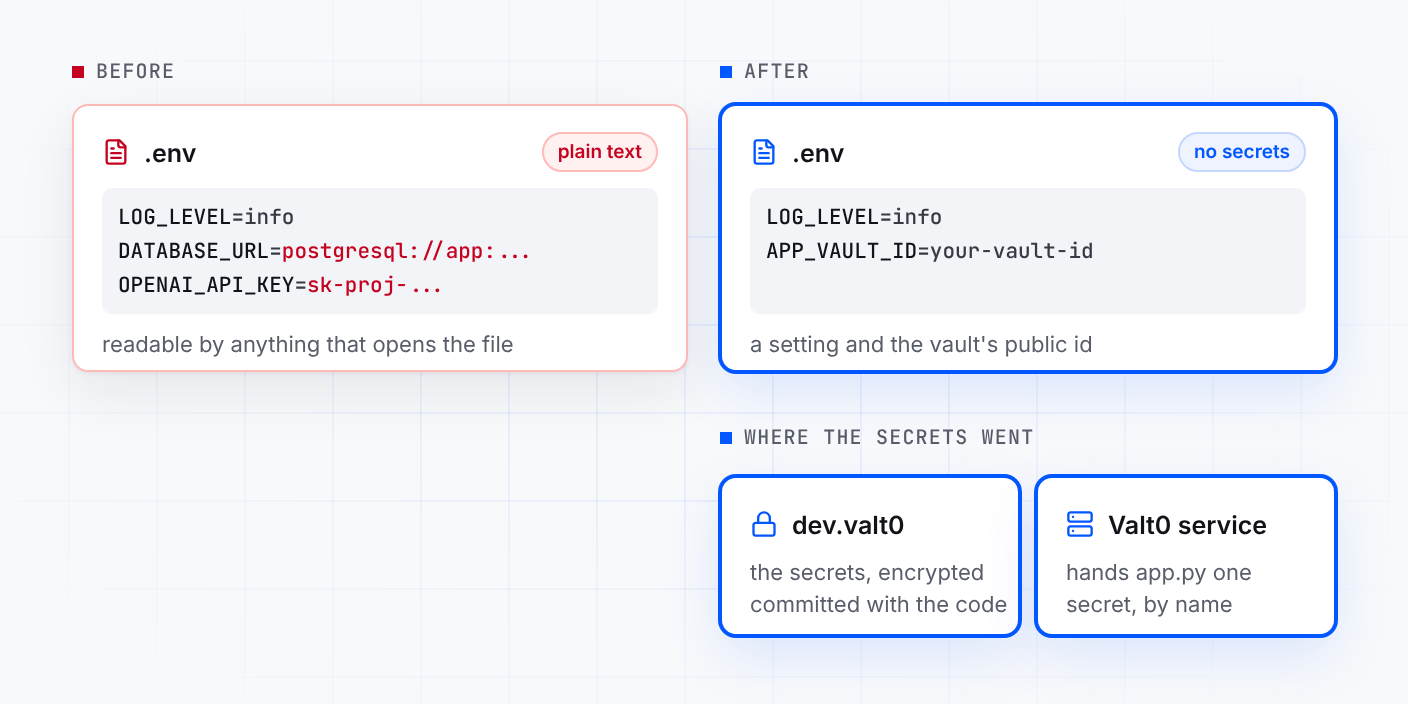
A typical .env next to a Python app looks like this:
LOG_LEVEL=info
DATABASE_URL="postgresql://app:example-password@localhost:5432/app"
OPENAI_API_KEY=sk-proj-xxxxxxxxxxxx
And the app reads it into the environment, then takes each value from there:
import os

import psycopg
from dotenv import load_dotenv
from openai import OpenAI

load_dotenv()

conn = psycopg.connect(os.environ["DATABASE_URL"])
client = OpenAI(api_key=os.environ["OPENAI_API_KEY"])
LOG_LEVEL is a setting. The other two are secrets: the database password sits
inside the URL, between the colon and the @, and the OpenAI key is right there.
The file is plain text, so anything that can read it can use them: a teammate's laptop, a
backup, a copy pasted into a chat, a tool or agent working in the project folder. That is why
it is kept out of git and handed around some other way, and each of those ways is one more
copy in the clear.
Move the secrets into a vault
You need Valt0 installed; valt0 status checks
that its service is running. Create a vault for development. Valt0 prints its key once, so put
it in your password manager now: without it nobody can open the vault, you included.
valt0 init dev
Store each secret under the name it has in .env. Valt0 asks for the key, then
the value: paste the value itself, not the quotes around it.
valt0 store dev:DATABASE_URL
valt0 store dev:OPENAI_API_KEYThe app never sees the vault key. It opens the vault by its id, which is public, and asks the local Valt0 service for each secret. Print the id:
valt0 info devRead them from Python
Install the client. It needs Python 3.9 or later:
python -m pip install valt0-client
Keep python-dotenv for the settings. In .env, the two secrets give way to the
vault's id, the one valt0 info printed. It is safe there:
LOG_LEVEL=info
APP_VAULT_ID=your-vault-id
And app.py opens the vault once, then asks it for each secret by name where it
sets up the library that needs it:
import os

import psycopg
import valt0
from dotenv import load_dotenv
from openai import OpenAI

load_dotenv()

vault = valt0.open_vault(id=os.environ["APP_VAULT_ID"], name="app")

with vault.secret("DATABASE_URL") as secret:
    conn = psycopg.connect(secret.reveal())

with vault.secret("OPENAI_API_KEY") as secret:
    client = OpenAI(api_key=secret.reveal())
reveal() hands the library the value, and the with block wipes the
client's copy when it ends. Anywhere else, a secret prints as [REDACTED]: in
print(), an f-string, a log line, or json.dumps with default=str. Pickling or copying
one raises TypeError. If the service can't be reached or the vault can't be
loaded, open_vault raises an error, and the app stops at startup instead of
running without its secrets.
From here
-
Delete the old values. The secrets now exist twice, encrypted in
dev.valt0and in plain text in any old copy of.env. Once the app runs from the vault, take them out of every copy you sent around. -
New teammates clone the repo and get one key from you instead of a file of
passwords, plus the public id for their own
.env. They runvalt0 import dev, andvalt0 import dev --forceafter pulling a vault that changed. -
Changing a value is
valt0 store dev:OPENAI_API_KEY --forceand a restart. That changes the vault, not the provider: if a key may have leaked, revoke it with the provider first, then store the new one. -
Production gets its own vault, with the same secret names and its own
APP_VAULT_ID, so a leakeddevkey leaves it alone. Deployment covers servers.
Every call the client offers, with its errors and the asyncio version, is on
The Python client. The same steps for Node.js are in
Get your Node.js secrets out of .env.
Sources: python-dotenv on PyPI, dotenv on PyPI, pip user guide, VS Code: Python environments, Valt0 Python client docs.