

On 30 October, Northflank told its customers to "assume all environment variables have been decrypted" and to disable or rotate every key. Users then confirmed that AI API keys stored on the platform had been used by someone else. If you deploy on Northflank, rotate your AI provider keys first, today, then everything else it holds.
Wiz counts at least nine AI developer platforms that disclosed incidents in October. Northflank is the third in a month where customers' environment variables were at risk, after Zeabur and Railway. On 1 November, Trigger.dev said an attacker had accessed environment variables for a subset of its organizations too.
What happened
Northflank's status page lays out the day, all times UTC on 30 October:
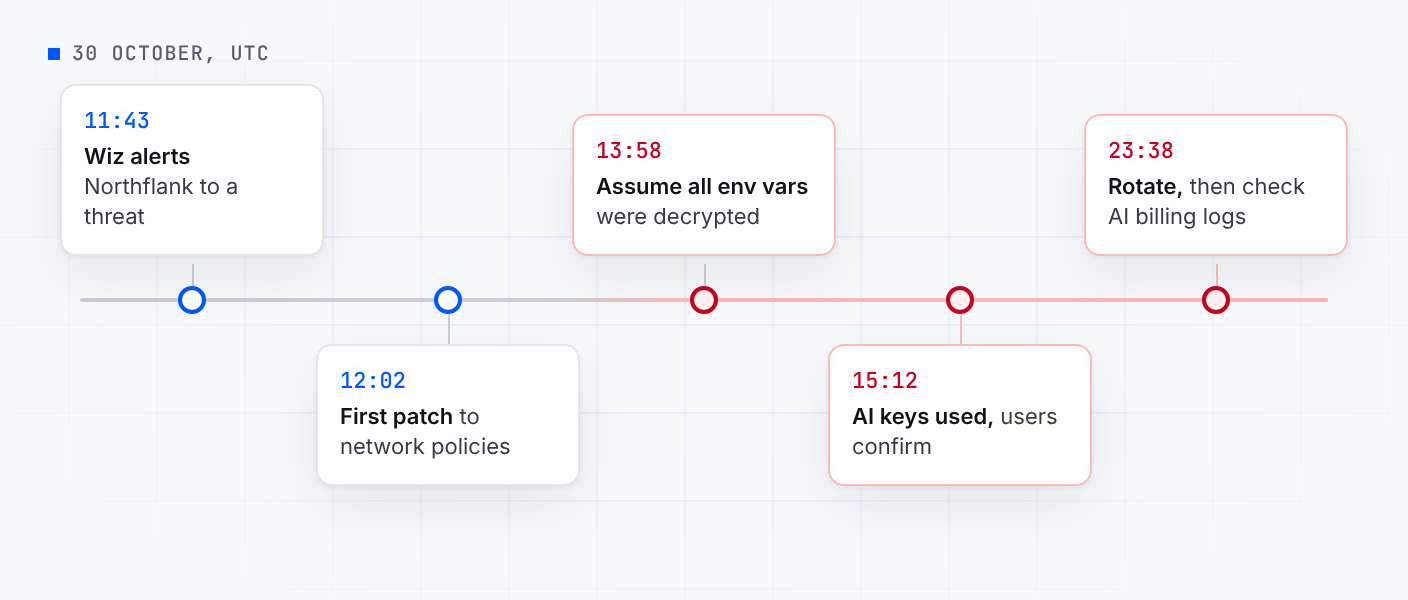
- 11:43: a threat alert came in from the security company Wiz. Engineers were on it a minute later, and patched network policies at 12:02, 12:50 and 13:05. At 13:00 Northflank asked Wiz's incident response team for help.
- 13:58: "Assume all environment variables have been decrypted. Disable/rotate all keys."
- 15:12: "Multiple users are confirming that their AI keys have been used." Northflank turned on credential rotation for Postgres and MongoDB add-ons and asked users to turn off public access to add-ons.
- 23:38: users reported unauthorized use of AI API keys stored on the platform. Northflank asked everyone to rotate the secrets they had given it: revoke them with the provider that issued them, make replacements, update workloads, and review AI provider usage and billing logs.
On 31 October Northflank turned on audit logs for every customer, free accounts included, and added rotation for MySQL, Redis, MinIO and RabbitMQ add-ons. As of its last update that day, it hadn't said how the attacker got in, how the variables were decrypted, or how many customers were affected.
The same day the incident started, Wiz published "Black October", a list of at least nine AI developer platforms that disclosed incidents in October, Northflank among them. Wiz says there is "no single vulnerability or dependency linking these attacks", but that public reports describe attackers "explicitly hunting stored environment variables", especially ones that give access to AI models.
What to do now
Don't wait to be told you were affected. Northflank's advice is for every user, and users confirmed stolen keys were used within hours.
- AI provider keys first. Create a new key in your OpenAI, Anthropic, Google or other provider's console, revoke the old one, then put the new one in Northflank and redeploy. Revoke before you update: changing the value in Northflank does nothing to the copy someone else holds. Expect a short outage.
- Then everything else Northflank holds. Its list is secrets on workloads, secret groups and global secrets. Do it the same way, at the source: cloud credentials, database passwords, payment keys, tokens. Secret files sit on the same services and secret groups, so rotate what's in them too.
- Add-ons. Turn off public access where it's on, and rotate each add-on's credentials with the rotation Northflank has now enabled for Postgres, MongoDB, MySQL, Redis, MinIO and RabbitMQ.
- Look for use. Check each AI provider's usage and billing, and the logs of every service a rotated credential opened. Northflank's audit logs are now on for all accounts. Report anything odd to Northflank and to the provider.
Why the variable store is the target
Northflank's docs say it "injects build arguments and runtime variables into build and runtime workloads by default". To do that, the platform has to be able to read every value in plain text, however it's stored. So when an attacker reaches the part of a platform that does the decrypting, every customer's secrets are in one place.
And AI keys turn straight into money. Wiz describes stolen AI access being resold, and in two cases it looked at, the first unauthorized use of credentials stolen in a vendor breach came within 30 minutes. Wiz estimates those two cases likely ran up more than $100,000 at list price. Wiz doesn't link them to Northflank. The Railway post goes through the rest: why encryption at rest and sealed values don't change who can read a variable.
What Northflank's variable store would have held for a Valt0 app
In an app that keeps its secrets in a Valt0 vault, Northflank's variables would have held a mode, a folder path and a vault id. None of them is an AI key.
Valt0 keeps an app's secrets in one encrypted file that ships with the code. Without its key the
file can't be read. An existing .env becomes a vault in one command, and a second
one, run once on your own machine, makes the two keys a deployment needs:
valt0 convert .env --output prod
valt0 deploy generate-keys prod.valt0- The prime key goes in the Dockerfile. It primes the vault while Northflank builds the image. On its own it opens nothing, so it can sit in a build file.
-
The unlock key file goes on a volume. Attach a Northflank volume to the
service at
/valt0-keysand put the file there. Not in a secret file: Northflank keeps those with the rest of the secrets, and its docs say they're "injected at runtime or build time".
RUN wget -qO- https://dl.valt0.com/v1/latest/install.sh \
    | sh -s -- --version 1.1.1
COPY prod.valt0 .
RUN valt0 deploy prime prod.valt0 VLT0-PRIME-KEY-...
Do it in this order. First attach the volume. One created as Single Read/Write can be mounted by one instance at a time, and the mode can't be changed later, so pick Multi Read/Write if you'll run more than one. Then copy the unlock key file onto it once with Northflank's CLI, which copies into a running service:
northflank upload service file --projectId my-project --service my-api \
  --localPath ./<unlock-key-file> --remotePath /valt0-keys/<unlock-key-file>
If the service can't stay up long enough for the copy, Northflank's guide to moving data has other ways, such as an rsync service with the volume attached.
Then set these three in the service's runtime variables or a secret group and redeploy. They're all Northflank needs to hold:
VALT0_MODE=deploy
VALT0_UNLOCK_KEYS_DIR=/valt0-keys
APP_VAULT_ID=VLT0-ID-...
The app asks for each secret by name. In Node.js, with Anthropic's SDK:
npm install @valt0/client @anthropic-ai/sdkimport Anthropic from '@anthropic-ai/sdk';
import { openVault } from '@valt0/client';
const vault = await openVault({ id: process.env.APP_VAULT_ID, name: 'app' });
const key = await vault.secret('ANTHROPIC_API_KEY');
export const anthropic = new Anthropic({ apiKey: key.reveal() });
key.destroy();
destroy() wipes Valt0's copy as soon as the SDK has the key, and until then the
Secret prints as [REDACTED] in logs, JSON and stack traces. Both
packages need Node.js 20 or later. There are Valt0 clients for Go
and Python too.
Read that variable store and you get a mode, a path and an id. The prime key is in your repo and your image, the unlock key file is on a volume, and opening the vault takes both.
Northflank hasn't said how the attacker got in, so a Valt0 app on Northflank has one job this
week too: make a new pair of deployment keys with valt0 deploy generate-keys, put
the new prime key in the Dockerfile and the new unlock key file on the volume in place of the old
one, and redeploy.
Rotate the AI keys now, the rest today. Then, wherever you deploy next, start with Turn an .env file into a vault and the deployment guide, so the next read of a platform's variable store finds a mode, a path and an id.
Sources: Northflank's status page (30 and 31 October updates) and docs on secrets, secret files, volumes and copying files; Wiz's Black October; Trigger.dev's disclosure; and @anthropic-ai/sdk on npm.