

You get a Claude API key from the API keys page of the Claude Console.
Anthropic's SDKs read it on their own from ANTHROPIC_API_KEY, and so does
Claude Code, which will use that key instead of your Pro or Max subscription once you
approve it. That explains a lot of "credit balance" and "organization disabled" errors.
This post covers where the key goes, how to check which credential Claude Code is using,
and how to move the key out of your shell profile and .env into an encrypted
Valt0 vault, for your own code and for Claude Code.
Get the key
Sign in to the Claude Console and open the API keys page. Click Create key, name it, choose when it expires, and set Linked account to yourself. Anthropic calls that a personal key, for your own development. For anything shared, such as a production service or a CI pipeline, it recommends a service account key instead.
Pick a workspace for the key as well. A key scoped to one workspace works as it is. A key
that isn't has to send an anthropic-workspace-id header with every request,
or the API answers with a 400 error, and the examples in this post don't send one. The
expiry can't be changed later: Anthropic suggests Never for a key kept in
a secrets manager and rotated by hand, and with a date you make a new key when it runs out
and store that one instead.
The Console shows the full key, which starts with sk-ant-, once. Copy it
then. If you lose it, you can't see it again; you make a new one. If the
Create key button is greyed out, your role might not allow it: ask an
organization admin to change your role, or to create a service account key for what you
are building.
Where the SDK looks for it
Anthropic's docs tell you to set the key as an environment variable, and both SDKs read
ANTHROPIC_API_KEY when you don't pass a key yourself:
from anthropic import Anthropic

client = Anthropic() # reads ANTHROPIC_API_KEYimport Anthropic from '@anthropic-ai/sdk';
const client = new Anthropic(); // reads ANTHROPIC_API_KEYWhen Claude Code uses the key instead of your plan
Claude Code checks several credentials in a fixed order, and
ANTHROPIC_API_KEY comes before the subscription login you made with
/login. In an interactive session it asks you once whether to use the key and
remembers the answer. With claude -p, it always uses the key when one is set.
So a key you exported months ago for a script can quietly take over from your Pro or Max
plan. Claude Code's error reference names three symptoms:
-
Credit balance is too low, while you pay for a plan: an approved key sends requests through that key and its Console balance instead. -
This organization has been disabled: the key belongs to a Console organization that was disabled. -
Invalid API key · Fix external API key: the key was revoked or mistyped. Claude Code's docs add that direnv, dotenv shell plugins and IDE terminals can load a stale key from a.envfile in your project without you noticing.
Check which ANTHROPIC_ variables your shell has. This prints the names
only, so the key doesn't end up on your screen:
env | grep -E '^ANTHROPIC_' | cut -d= -f1
Inside Claude Code, /status shows the credential in use. To go back to your
subscription, run unset ANTHROPIC_API_KEY, take the
export line out of your shell profile, and start claude again.
To keep the variable but stop Claude Code from using it, turn off
Use custom API key in /config.
"Your organization has disabled Claude subscription access"
This one is the other way round. The full message is
Your organization has disabled Claude subscription access for Claude Code · Use an
      Anthropic API key instead, or ask your admin to enable access
. It is a setting on
your organization's side that local settings, environment variables and flags can't
override, and running
/login again with the same account gets the same error. Either your admin
turns access on, or you sign in with a Console API key. If you go the key route, the last
part of this post shows how to hand it to Claude Code from a vault. People on personal Pro
and Max plans, with no admin to ask, have reported the same message in
Claude Code's GitHub issues;
if that's you, Anthropic support
is the place to ask.
Where the key ends up
Anthropic's example is an export line, which often ends up in
~/.zshrc or ~/.bashrc. Projects often put the key in
.env instead. Either way it is plain text in a file:
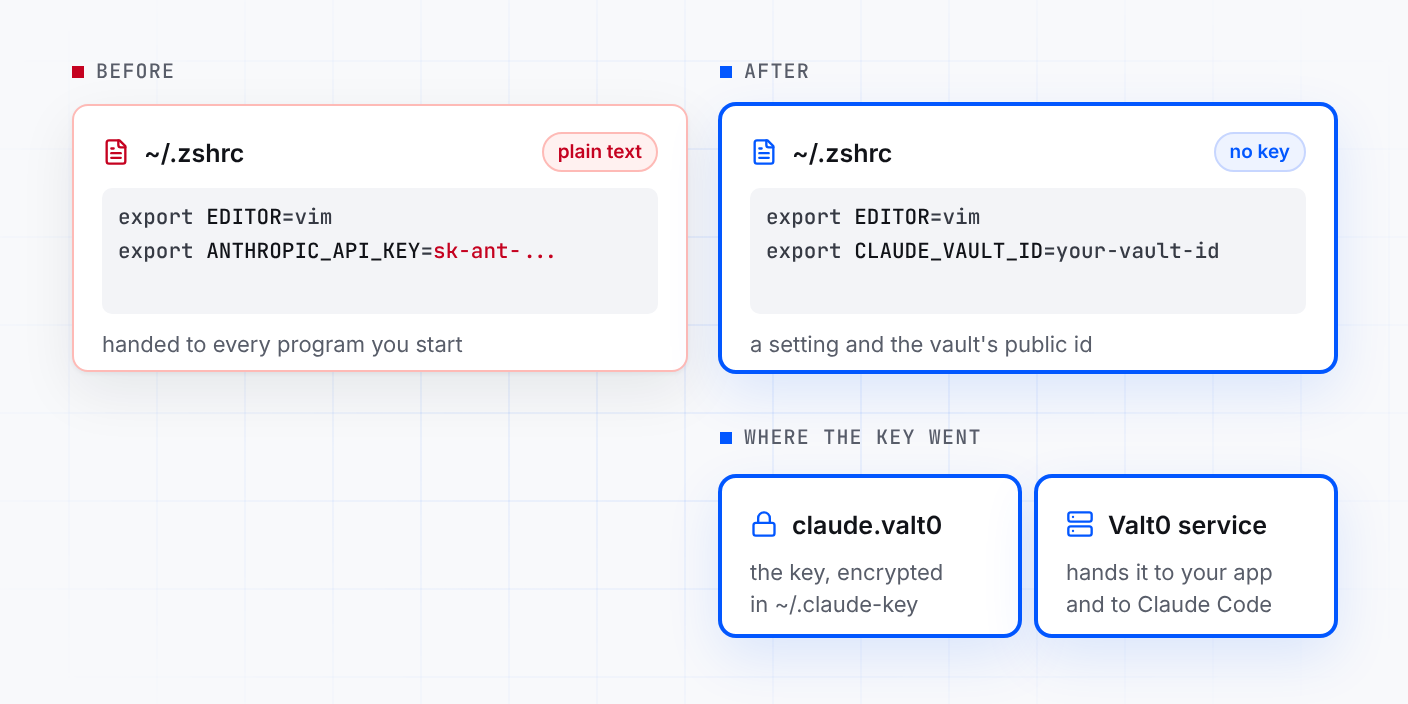
export EDITOR=vim
export ANTHROPIC_API_KEY=sk-ant-...
Anthropic's support article on keys says never to put the key directly in your code or
configuration files, to keep a local .env out of git, and for cloud
deployments to prefer encrypted secret storage over dotenv files. If a key turns up in a public GitHub repository, GitHub tells Anthropic, and
Anthropic deactivates it and emails you. A copy in a file can be read by whatever reads
that file, from a backup to a coding agent that was asked to look around the project. A variable in your shell profile is handed to every program you start
from that shell.
Keep the key in a vault
A personal key is yours alone (Anthropic's advice is that each person gets their own), so
give it a vault of its own, in a folder of your own rather than in a project. You need
Valt0 installed; valt0 status checks that its
service is running.
mkdir -p ~/.claude-key
cd ~/.claude-key
valt0 init claude
That makes claude.valt0 and prints its key once. Put the vault key in your
password manager now: without it nobody can open the vault, you included. Then store the
Claude key. Valt0 asks for the vault key, then for the value: paste the
sk-ant- key.
valt0 store claude:ANTHROPIC_API_KEYYour code and Claude Code never need the vault key. They name the vault by its public id and ask the Valt0 service running on your machine for one secret. Print the id:
valt0 info claudeIn your shell profile, replace the key line with the id. It is safe there:
export EDITOR=vim
export CLAUDE_VAULT_ID=your-vault-id
Open a new terminal afterwards, so the old key is no longer in the environment of what you
run. If a project's .env also has the key, take that line out too.
Python
Valt0's client needs Python 3.9 or later and the current anthropic SDK needs
3.10, so use 3.10 or later:
python3 -m pip install valt0-client anthropicPass the key to the SDK yourself, from the vault:
import os

import valt0
from anthropic import Anthropic

vault = valt0.open_vault(id=os.environ["CLAUDE_VAULT_ID"], name="claude")

with vault.secret("ANTHROPIC_API_KEY") as secret:
    client = Anthropic(api_key=secret.reveal())

message = client.messages.create(
    model="claude-opus-5-5",
    max_tokens=1024,
    messages=[{"role": "user", "content": "Hello, Claude"}],
)
print(message.content)
reveal() hands the SDK the value as a string, which the SDK keeps and Python
can't wipe, and the with block wipes Valt0's own copy when it ends. Anywhere else, the secret prints as [REDACTED]: in
print(), an f-string or a log line. If the service can't be reached,
open_vault raises an error and the script stops before it calls Claude.
Node.js
npm install @valt0/client @anthropic-ai/sdkimport Anthropic from '@anthropic-ai/sdk';
import { openVault } from '@valt0/client';
const vault = await openVault({ id: process.env.CLAUDE_VAULT_ID, name: 'claude' });
const apiKey = await vault.secret('ANTHROPIC_API_KEY');
const client = new Anthropic({ apiKey: apiKey.reveal() });
apiKey.destroy();
const message = await client.messages.create({
model: 'claude-opus-5-5',
max_tokens: 1024,
messages: [{ role: 'user', content: 'Hello, Claude' }],
});
console.log(message.content);
destroy() wipes Valt0's copy straight after. The SDK keeps the string it was
given, because a JavaScript string can't be wiped, but the key is no longer in
process.env or in a file next to your code. Valt0's client and the current
Anthropic SDK both need Node.js 20 or later.
Give Claude Code the key from the vault
Claude Code has a setting for this: apiKeyHelper, a command it runs to get
the key, which must print the key and nothing else. Anthropic's docs suggest it for keys
that come from a vault. A few lines of Python with Valt0's client do the job.
Give the helper its own small Python environment, so it works from any folder:
python3 -m venv ~/.claude-key/venv
~/.claude-key/venv/bin/python -m pip install valt0-client
Save the helper next to the vault, with the id that valt0 info claude
printed:
import sys

import valt0

vault = valt0.open_vault(id="your-vault-id", name="claude")

with vault.secret("ANTHROPIC_API_KEY") as secret:
    sys.stdout.write(secret.reveal())
Check that it works without putting the key on screen. This prints how many characters
the helper wrote. If the service can't be reached, you get an error and a
0 instead:
~/.claude-key/venv/bin/python ~/.claude-key/key.py | wc -c
Then point Claude Code at it: add this line to your user settings, keeping whatever else
the file already holds. Use this file and not a project's
.claude/settings.json, which is committed and shared with everyone who clones
the repository:
{
  "apiKeyHelper": "~/.claude-key/venv/bin/python ~/.claude-key/key.py"
}
ANTHROPIC_API_KEY ranks above the helper, so make sure it is gone from your
shell, then start claude and check /status: it should name
apiKeyHelper as the source. Claude Code keeps what the helper printed for five
minutes, then runs it again. If the helper fails, for example because the Valt0 service
isn't running, Claude Code shows Your apiKeyHelper script is failing; run the
check above to see why.
The helper also ranks above your /login, so set it up only when you want
Claude Code to bill this key. While it is set, Remote Control and voice dictation, which
need your claude.ai login, aren't available. To go back to your subscription, remove the
apiKeyHelper line. The setting is read by the claude CLI and the
tools that run it, such as the VS Code extension and the Agent SDK. The Claude Desktop app
and cloud sessions don't call it and sign in with your account, unless the desktop app is
set up for a third-party gateway.
From here
-
If the key may have leaked, delete it on the
API keys page straight away,
which is Anthropic's advice. Then create a new key, store it from
~/.claude-keywithvalt0 store claude:ANTHROPIC_API_KEY --force, and restart what uses it. - Teammates make their own personal key and their own vault the same way. Anthropic's advice is that everyone who needs access gets their own key.
-
Keep it out of browser code. The TypeScript SDK turns browser support
off by default to avoid exposing your key, and only runs there if you set
dangerouslyAllowBrowser. Call Claude from your server. - Production gets a service account key in a vault of its own, committed with the app, under the same secret name. Deployment covers servers, and the clients are in the Python and Node.js docs.
Other secrets in the same .env go the same way:
Turn an .env file into a vault converts a whole file in one
step, and the Gemini and
OpenAI versions of this post cover those
keys.
Sources: Anthropic: Get your Claude API key, Anthropic: Select a workspace, Anthropic: API key best practices, Claude Code: Authentication, Claude Code: Errors, Claude Code: apiKeyHelper, anthropic for Python, @anthropic-ai/sdk for TypeScript, Valt0 Python client docs, Valt0 Node.js client docs.