

You generate a Groq API key in the GroqCloud console, on the
API Keys page. Groq's quickstart then has you
export it as GROQ_API_KEY, and the official Python and Node.js SDKs read that
variable on their own. That is why the key so often ends up in a shell profile or a
.env file. This post covers getting the key, the ways your code picks it up,
and how to keep it in an encrypted Valt0 vault instead.
Get the key
Sign in to console.groq.com/keys and create a key. Two things to know before you click:
-
Groq is not Grok. Groq, with a q, is GroqCloud, and its keys come from
console.groq.com. Grok is xAI's model: its keys come from xAI's
console (console.x.ai) and go in
XAI_API_KEY. A key from one won't work with the other. - A key belongs to a project. Groq's projects page says any key you generate is specific to the project selected in the console, and rate limits are applied per project. Pick the project first.
Groq's security guide asks for one key per environment (dev, staging and prod), so a key leaked from your laptop isn't the one your production app uses. It also says never to put a key in source code, and gives two places for it instead: "Use environment variables or a secret management system." The rest of this post is about the second.
How your code finds it
The quickstart sets the key in your terminal:
export GROQ_API_KEY=<your-api-key-here>
Then the client finds it without being told. Install it with
pip install groq (Python 3.10 or later). This is the README's example, and its
comment says the api_key line can be left out, because reading
GROQ_API_KEY is the default:
import os
from groq import Groq

client = Groq(
    api_key=os.environ.get("GROQ_API_KEY"),  # This is the default and can be omitted
)

chat_completion = client.chat.completions.create(
    messages=[
        {
            "role": "user",
            "content": "Explain the importance of low latency LLMs",
        }
    ],
    model="openai/gpt-oss-20b",
)
print(chat_completion.choices[0].message.content)
In Node.js the package is groq-sdk (Node.js 20 or later), and
new Groq() reads process.env['GROQ_API_KEY'] the same way. The
quickstart's JavaScript example uses the AI SDK instead (ai and
@ai-sdk/groq), whose groq provider also reads
GROQ_API_KEY by default.
Groq's API is also mostly compatible with OpenAI's, so plenty of code uses the
openai package pointed at Groq. There the key is passed by hand, from the same
variable:
import os
import openai

client = openai.OpenAI(
    base_url="https://api.groq.com/openai/v1",
    api_key=os.environ.get("GROQ_API_KEY"),
)
If you don't want to export the key in every terminal, the Python SDK's README suggests
python-dotenv and a line in .env, so the key stays out of source control.
Where the key ends up
Either way, the setup leaves the key in plain text in a file:
LOG_LEVEL=info
GROQ_API_KEY=the-key-itself
Or as an export line in ~/.zshrc or ~/.bashrc.
Anything that can read that file can use the key: a backup, a copy sent to a teammate, a
tool or coding agent working in the project folder. And a variable in the environment is
handed down to every process the app or the shell starts. To see where yours lives, these
print variable names and file names, not the key, so it doesn't land on your screen:
env | grep '^GROQ_' | cut -d= -f1
grep -l 'GROQ_API_KEY' ~/.zshrc ~/.zprofile ~/.bashrc ~/.bash_profile ~/.profile .env 2>/dev/null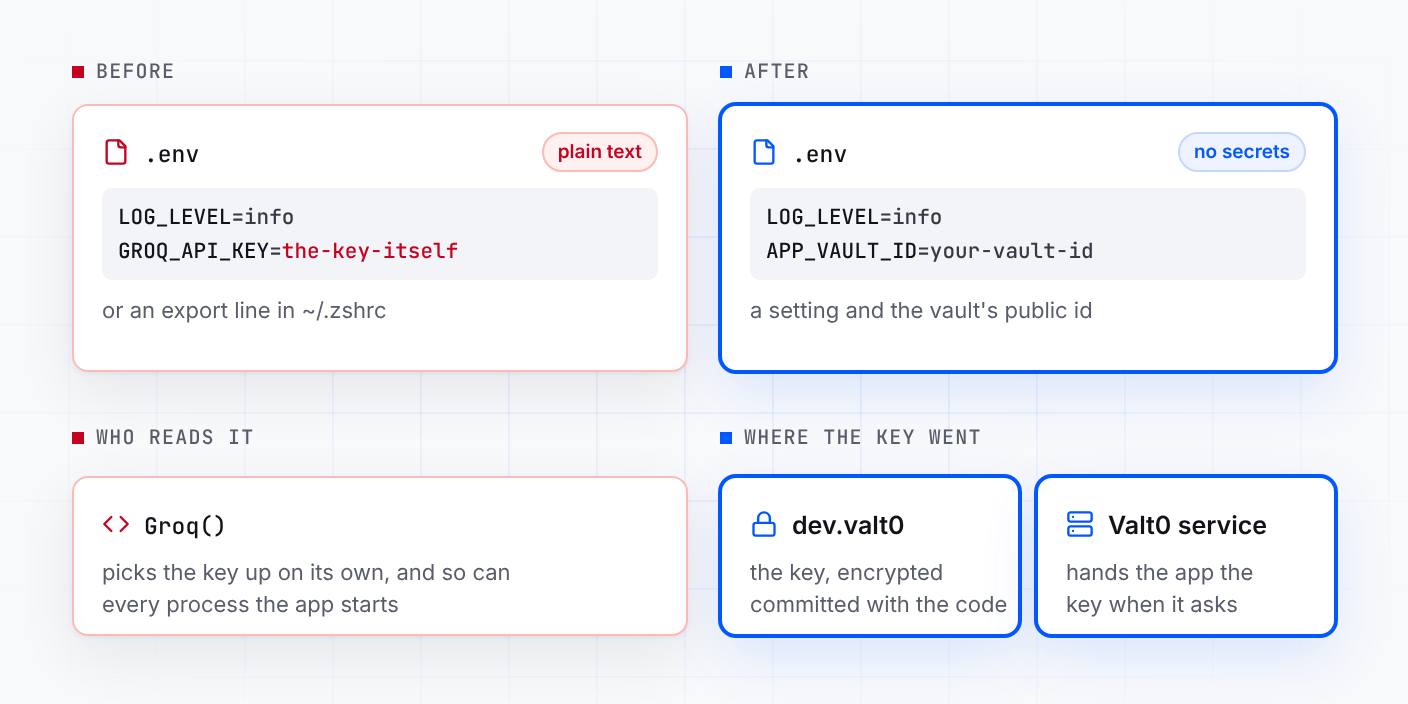
Keep the key in a vault
You need Valt0 installed; valt0 status checks
that its service is running. Create a vault for development. Valt0 prints its key once, so
put it in your password manager now: without it nobody can open the vault, you included.
valt0 init devStore the Groq key under the same name. Valt0 asks for the vault key, then for the value: paste the Groq key.
valt0 store dev:GROQ_API_KEY
The app never sees the vault key. It opens the vault by its id, which is public, and asks
the local Valt0 service for the secret by name. valt0 init printed the id;
this prints it again:
valt0 info devPut that id in .env where the key was. It is safe there:
LOG_LEVEL=info
APP_VAULT_ID=your-vault-id
Commit dev.valt0 with the code. Without the vault key it can't be read. Then
take the export GROQ_API_KEY line out of your shell profile and open a new
terminal, or the key is still in plain text there and still in the environment of
everything you run.
Python
Install the clients. Valt0's needs Python 3.9 or later and groq needs 3.10, so
use 3.10 or later. python-dotenv keeps reading the settings in .env:
python -m pip install valt0-client groq python-dotenvThen pass the key to Groq yourself, from the vault:
import os

import valt0
from dotenv import load_dotenv
from groq import Groq

load_dotenv()

vault = valt0.open_vault(id=os.environ["APP_VAULT_ID"], name="app")

with vault.secret("GROQ_API_KEY") as secret:
    client = Groq(api_key=secret.reveal())

chat_completion = client.chat.completions.create(
    messages=[
        {
            "role": "user",
            "content": "Explain the importance of low latency LLMs",
        }
    ],
    model="openai/gpt-oss-20b",
)
print(chat_completion.choices[0].message.content)
reveal() hands the SDK the value, and the with block wipes
Valt0's copy when it ends. The SDK keeps the string it was given, because a Python string
can't be wiped, but the key is no longer in the environment or in a file next to your code.
Anywhere else, the secret prints as [REDACTED]: in print(), an
f-string or a log line. If the service can't be reached, open_vault raises an
error and the app stops at startup.
Using the openai package against Groq instead? Install it in place of
groq, swap from groq import Groq for import openai,
and the line inside the with block becomes:
with vault.secret("GROQ_API_KEY") as secret:
    client = openai.OpenAI(
        base_url="https://api.groq.com/openai/v1",
        api_key=secret.reveal(),
    )
Node.js
npm install @valt0/client groq-sdkimport Groq from 'groq-sdk';
import { openVault } from '@valt0/client';
const vault = await openVault({ id: process.env.APP_VAULT_ID, name: 'app' });
const secret = await vault.secret('GROQ_API_KEY');
const client = new Groq({ apiKey: secret.reveal() });
secret.destroy();
const chatCompletion = await client.chat.completions.create({
messages: [{ role: 'user', content: 'Explain the importance of low latency LLMs' }],
model: 'openai/gpt-oss-20b',
});
console.log(chatCompletion.choices[0].message.content);
destroy() wipes Valt0's copy straight after. The SDK keeps the string it was
given, because a JavaScript string can't be wiped, but the key is no longer in
process.env or in any file next to your code. Both @valt0/client
and groq-sdk need Node.js 20 or later. To get APP_VAULT_ID from
.env, start the app with node --env-file=.env app.mjs (the flag arrived in
Node.js 20.6).
On the AI SDK instead, make the provider yourself with the key from the vault, and use it
where the quickstart uses groq. The current ai package needs
Node.js 22 or later:
npm install @valt0/client ai @ai-sdk/groqimport { createGroq } from '@ai-sdk/groq';
import { generateText } from 'ai';
import { openVault } from '@valt0/client';
const vault = await openVault({ id: process.env.APP_VAULT_ID, name: 'app' });
const secret = await vault.secret('GROQ_API_KEY');
const groq = createGroq({ apiKey: secret.reveal() });
secret.destroy();
const { text } = await generateText({
model: groq('openai/gpt-oss-20b'),
prompt: 'Explain the importance of low latency LLMs',
});
console.log(text);From here
-
If the key may have leaked, revoke it in the console first, as Groq's
security guide says to do "immediately if compromise is suspected", and don't bring it
back. Then create a new one, store it with
valt0 store dev:GROQ_API_KEY --forceand restart the app. The same command is how you do the periodic rotation the guide recommends (it suggests quarterly). -
Teammates get
dev.valt0when they clone the repo and the vault key from you. They runvalt0 import devonce before the app can read it. -
Keep it out of browser code. Groq's guide says never to embed keys in
frontend code or browser bundles, and the Node.js SDK won't run in a browser unless you
set
dangerouslyAllowBrowser. Call Groq from your server and have the browser talk to that. - Production gets its own vault and its own Groq key, with the same secret name, which is the per-environment key Groq asks for. Deployment covers servers, and the Python client and the Node.js client pages cover the rest of the API.
Other secrets in the same .env go the same way:
Turn an .env file into a vault converts a whole file in one
step, and the OpenAI,
Claude and
Gemini versions of this post do the same for
those keys.
Sources: Groq quickstart, Groq: projects, Groq: security onboarding, Groq: OpenAI compatibility, groq for Python, groq-sdk for Node.js, xAI quickstart, Valt0 Python client docs, Valt0 Node.js client docs.