Claude Code's "don't ask again" put secrets on GitHub: check settings.local.json, then rotate
Vlad Vidican·· 7 min read
When you approve a shell command in Claude Code with "Yes, and don't ask again", it saves an
allow rule in .claude/settings.local.json. If the command had a password in it,
the rule has the password too, in plain text. Researchers at Apiiro found 1,122 public copies
of that file on GitHub with at least one secret in them, as
The Hacker News
reported on 7 November. If you use Claude Code, check whether the file was ever committed in
your repositories, and rotate anything it held before you clean it up.
What happened
Claude Code's own docs describe the mechanism. The first time you give a standing approval on
a permission prompt, Claude Code creates .claude/settings.local.json and saves
the approval there as an allow rule, so the same command runs without asking in
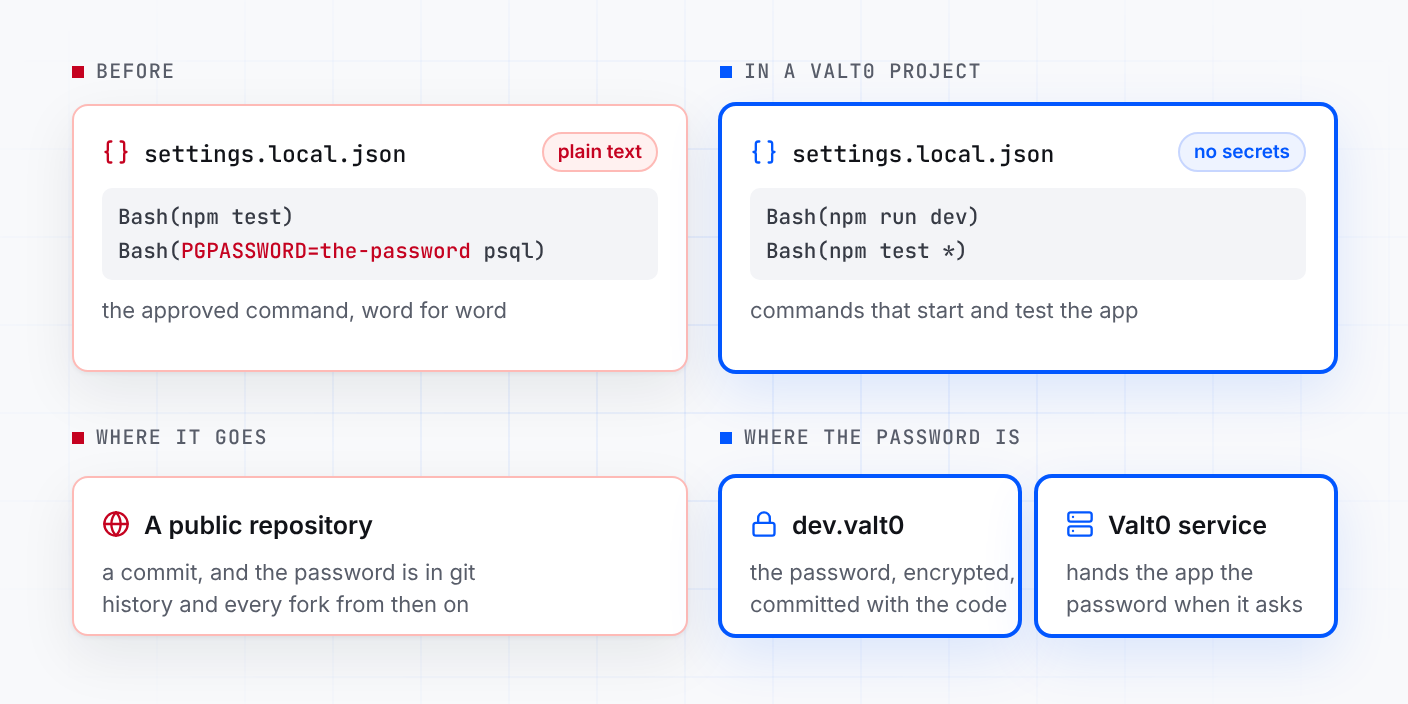
later sessions. A rule with no wildcard matches one exact command, so when the saved rule has
no wildcard, it is the command, word for word.
That is fine for npm test. It is not fine for a command with a secret in it, such
as a database client run with PGPASSWORD= in front of it, or a password after
mysql -p, two of the examples The Hacker News gives. Claude Code's
permissions docs also say an allow
rule won't match past an assignment of a variable other than a few known-safe ones, so a rule
for psql doesn't cover a command that starts with PGPASSWORD=.
According to The Hacker News, Apiiro found 104,185 copies of the file in 103,617 public
repositories. 1,122 of them, about 1.1%, held at least one secret, 1,379 distinct secrets in
all. Among those were 379 database passwords, 43 SSH logins for public servers, 42 GitHub,
GitLab and npm tokens, and 23 AWS keys. Counting older versions of the file, the shared
.claude/settings.json and saved agent chat logs, the total was 2,539 secrets in
1,994 repositories.
The researchers didn't test whether any of the secrets still work. One company they notified
confirmed its key was live. They don't say whether anyone has used the secrets. When Apiiro
checked, every file with a secret was still on its repository's default branch, and in half of those
repositories it had been there for at least 217 days.
Why the file ended up in git
Claude Code tries to keep the file out of commits. Its
settings docs say that the first time
it writes the file in a repository, it adds **/.claude/settings.local.json to
your global git excludes file. As The Hacker News puts it, that protection stays on one
computer. The researchers add that it does nothing for a file that was already committed,
and Claude Code doesn't add the file to the project's own .gitignore. If you made the file by
hand, the docs say to add it to .gitignore yourself.
Scanners don't catch all of it either. A password on a command line can look like any other
word. Gitleaks flagged 564 of the 1,122 files and TruffleHog 643, and 215 were flagged by
neither.
What to do now
Find the file in every repository, history included. In each clone, run
this from the repository root. It lists every commit on any branch that touched either
settings file, in any folder (older versions of Claude Code kept the file in the folder you
started it from):
Terminal
If it prints nothing, the files were never committed on the branches this clone has.
Rotate first, clean up after. Read every version of the file, not only the
current one, and list each password, token and key in it. This prints them, so run it
somewhere private:
Terminal
git log --all -p -- '*.claude/settings*.json'
For each one, make a new credential at the source and revoke the old one: the database
user's password, the SSH key on the server, the GitHub or npm token, the AWS access key. Do
this before you touch the file. Deleting it from the repository doesn't take it back: git
history and forks keep the old copies.
Stop tracking the file. Remove it from the repository but keep your copy,
and add it to the project's .gitignore so a teammate's machine ignores it too.
When teammates pull this commit, git deletes their copy of the file, so tell them to save
their rules first:
Terminal
gitrm --cached $(git ls-files '*.claude/settings.local.json')
printf'\n**/.claude/settings.local.json\n'>> .gitignore
gitadd .gitignore
git commit -m "Stop tracking Claude Code local settings"
The first line untracks every copy, in any folder. The rule in .gitignore
covers them all too.
Clean the rules you still have. Open your local
.claude/settings.local.json, or run /permissions in Claude Code, and
delete every allow rule with a secret in it, including in clones you never pushed.
Check the shared file too..claude/settings.json is meant to be
committed. Apiiro found secrets in 298 of 76,011 public copies of it.
Keep secrets off the commands you approve. Approve a command family such as
npm test * rather than one exact command, and when a command needs a password,
don't type the password into it.
Why a command line is the wrong place for a secret
A secret typed into a command doesn't stay in that command. It lands in the agent's
transcript, in your shell history when you type it yourself, and here in a settings file that sits in the project folder next to
the code. Anything that copies the folder copies the secret: a commit, a backup, a zip sent
to a colleague.
An agent builds commands from what it reads. If the password is in a .env file in
the project, an agent asked to check the database can read it and put it on the command line
it asks you to approve. Claude Code's docs show
how to stop its file tools reading .env with a deny rule such as
Read(./.env), and the safest version of that project is one where the file has no
password in it to read.
What the file would have held in a Valt0 project
In a project that keeps its secrets in a Valt0 vault, the commands Claude runs to start and
test the app don't carry a password, because the app asks for it by name when it starts. So
the rules saved in settings.local.json are commands like these:
.claude/settings.local.json
{
"permissions":{
"allow":["Bash(npm run dev)","Bash(npm test *)"]}}
Valt0 keeps an app's secrets in one encrypted file that sits next to the code and is
committed with it. Without the vault key the file can't be read. If your passwords are in a
.env file today, one command makes a vault from it. Valt0 prints the vault key
once, so put it in your password manager:
Terminal
valt0 convert .env --output dev
Every variable in the file becomes a secret under the same name, so the
DB_PASSWORD line becomes the secret DB_PASSWORD. valt0 convert
only reads the .env, so delete it yourself once the app works without it, and
keep the settings that aren't secret in a new one. Then print the vault's id, which is
public, and put it in .env as APP_VAULT_ID:
Load .env when the app starts, for example with
node --env-file=.env app.mjs (Node.js 20.6 or later), or the way you do now. destroy() wipes Valt0's copy once the connection is open. A
Secret prints as [REDACTED] in a log line or an error; only
reveal() hands back the value. Valt0's Node.js client needs Node.js 20 or later. A teammate who clones the repository
runs valt0 import dev once before the app can read it, and gets the vault key
from you, through your password manager.
When you need the password yourself, valt0 get dev:DB_PASSWORD asks for the
vault key and then prints it, in your own terminal.
So even if settings.local.json or .env slipped into a commit, a scan
of that repository on GitHub would find two npm commands, a vault id and an encrypted
dev.valt0. None of them is a password.