

Fireworks AI, which runs AI models for other companies, has disclosed two breaches since October. In the first, it believes API keys and tokens that customers stored as secrets were captured. Two of its customers now say data taken through Fireworks held their users' credentials: Notion found API keys in AI chat transcripts, and Cursor found unredacted credentials in coding agent traces. If Fireworks, Notion or Cursor told you that you were affected, rotate the keys they listed today.
What happened
Fireworks, first incident. Fireworks says it found the activity on 6 October at 16:00 UTC: "an unauthorized third party accessed environment variables used in evaluation jobs in a limited number of customer accounts." It believes "environment variables, including API keys and tokens stored as secrets, were captured in certain affected accounts." It revoked the internal credentials that were used, rotated keys and tokens, and emailed the customers it identified. In a 9 November update, Fireworks says the evidence links this activity to a financially motivated group "aimed at selling tokens from unauthorized access to Large Language Models", and that for a limited set of accounts it also found "impact to secrets, datasets, and incomplete models."
Fireworks, second incident. On 23 October, a cloud provider that hosts Fireworks' research and development machines had a security incident of its own. On 24 October, Fireworks says, the attacker "used it to reach Fireworks development machines" and ran a workload there. Fireworks lists what was affected as resource metadata, billing information, and some customers' incomplete model weights and datasets. TechCrunch's report links this second breach to Notion's data.
Notion. Notion used Fireworks for classification jobs behind Insights, a feature that shows customers their own AI usage, and to serve open-weight models. Fireworks told Notion of the breach on 2 November, and on 8 November confirmed the final set of data: Notion AI chat transcripts from the Insights feature. Notion says fewer than 1% of its workspaces were affected, and for most of them the transcripts aren't labelled with an author or workspace. On 11 November it revoked Notion API keys found in the affected messages, and on 12 November it reported the third-party API keys it found to the companies that issued them.
Cursor. On 13 November, Cursor published the root cause of its 29 October incident, when an attacker put a trojanized copy of Anthropic's Claude Code extension in the cache behind Cursor's marketplace, where it sat for about 11 hours. In Cursor's words, an attacker "obtained an access key we had issued to Fireworks", exposed by Fireworks, and copied a storage bucket Cursor used to share data with it. The bucket held coding agent traces from sessions that weren't in Privacy Mode, mostly from 2025. Some of them held credentials that "had not been redacted": API credentials of fewer than 0.01% of Cursor's customers. Cursor says the attacker used those to reach some SaaS tools, and a credential found there to plant the extension. Cursor doesn't say which of Fireworks' incidents exposed its key.
What to do now
- If you got a notice, start with the keys it lists. Fireworks, Notion and Cursor have each contacted the customers they identified, and Cursor sent team admins lists of specific keys. If you didn't get a notice from Cursor, it says your data wasn't in the traces. Revoke each key with the company that issued it, then make a new one and update your apps. Fireworks puts it plainly: "Removing a stored secret alone does not invalidate the underlying credential." It says to rotate the credentials in its notice even if you find no sign they were used.
- Fireworks customers: replace your Fireworks API keys if they were revoked, and look for API keys, users, evaluators, training jobs and datasets you don't recognize. Fireworks asks you to send it the names or ids of any you find.
- Notion users: rotate what you pasted. Notion's advice to affected workspaces is that anyone who pasted "sensitive information, passwords, API keys, or other credentials into Notion AI during the timeframe of the incident" should rotate them.
- Cursor users: check the extension too. If you installed or updated Anthropic.claude-code 2.1.312 or 2.1.313 from the Cursor marketplace in the exposure window, follow Cursor's security notice. It warns that "Uninstalling the extension alone may not be enough."
- Look for use. Check the usage and billing of every AI provider whose key you rotated, and the logs of anything the other credentials opened.
Why chats and traces are the target
A chat transcript keeps, in Notion's words, quoted by TechCrunch, "any input to or output from the
model that was written to the chat." A coding agent's trace is the same record for code: what
you typed, and what the agent read or ran and sent to the model along the way. Cursor hasn't
said how the credentials got into its traces. But a key pasted into a prompt, a
.env file the agent opened, or a command that printed a token all land in the
same record.
And those records travel. Notion sent transcripts to Fireworks for classification, and Cursor shared traces through a bucket Fireworks could read. A key in a transcript lives as long as the transcript does, in every place it's copied to. And a working AI key is what groups like the one Fireworks describes, which sell AI model access, are looking for.
What a coding agent's trace holds in a Valt0 project
In a project that keeps its secrets in a Valt0 vault, the values are not in any file an
agent can open. When it reads the project and runs the app, its trace holds a vault id, a
secret's name and [REDACTED].
Valt0 keeps an app's secrets in one encrypted file that sits next to the code. Without its key
the file can't be read, and the key isn't in the project. Say an app reads an OpenAI key from
.env:
OPENAI_API_KEY=sk-proj-xxxxxxxx
One command makes a vault from that file. It prints the vault's key once: copy it into your
password manager. The second command prints the vault's public id. Valt0 doesn't change or
delete the .env, so delete it yourself once the app works.
Install Valt0 first if you haven't:
valt0 convert .env --output dev
valt0 info dev
Install the client next to the OpenAI SDK. The openai package needs Python 3.10
or later:
python -m pip install valt0-client openai
Then the app asks the local Valt0 service for the key by name, when it starts
(valt0 status checks the service is running):
import valt0
from openai import OpenAI

vault = valt0.open_vault(id="your-vault-id", name="dev")

with vault.secret("OPENAI_API_KEY") as secret:
    print("using", secret)  # using [REDACTED]
    client = OpenAI(api_key=secret.reveal())
The with block wipes Valt0's copy when it ends, and the OpenAI client keeps its
own. Until then the
Secret prints as [REDACTED] in print(), an f-string or a
log line.
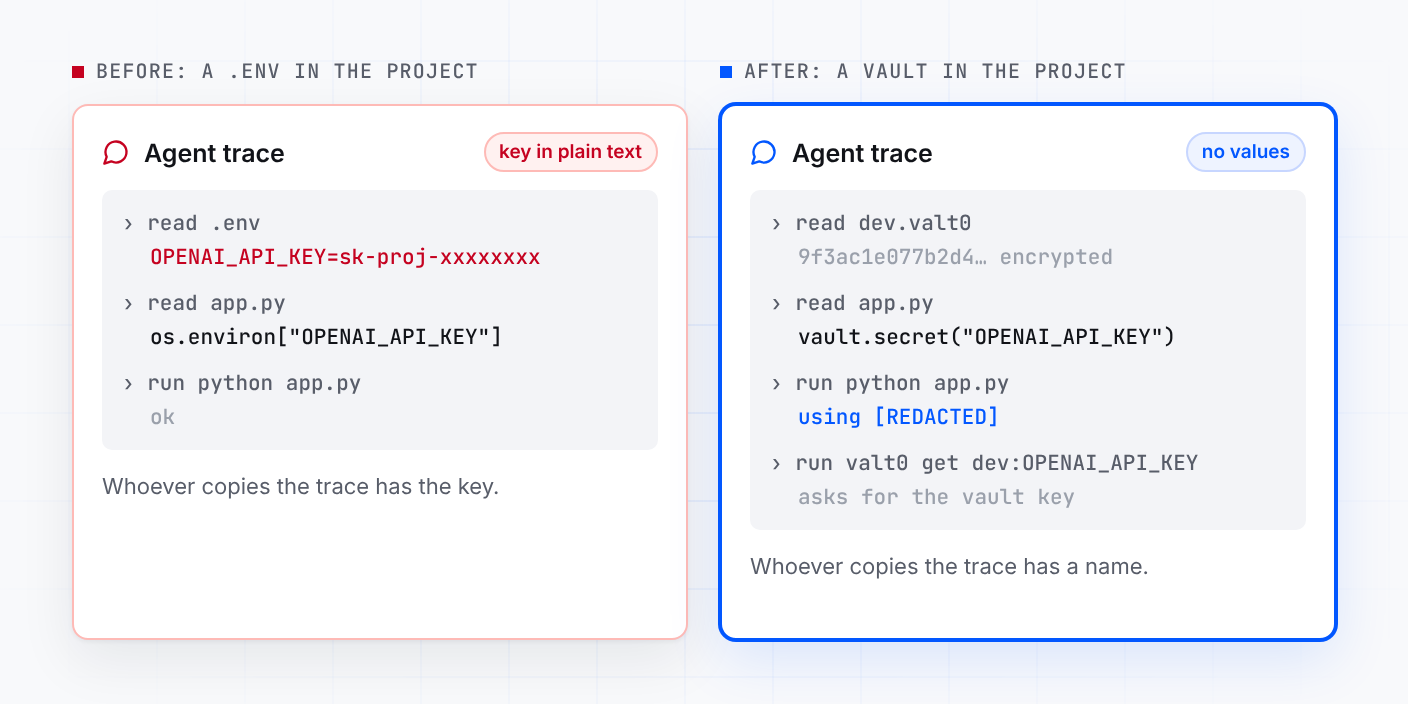
Now replay an agent's session in that project:
-
It opens
dev.valt0, and the trace gets encrypted bytes. -
It opens
app.py, and the trace gets the vault's id, which is public, and the nameOPENAI_API_KEY. -
It runs
python app.py, and the trace getsusing [REDACTED]. -
It tries
valt0 list devorvalt0 get dev:OPENAI_API_KEY, and Valt0 asks for the vault key first. The key is in your password manager.
If that old key ever sat in a .env an agent read in a session that was kept, make
a new one at the provider, revoke the old one, and store the new value with
valt0 store dev:OPENAI_API_KEY --force. When the agent needs a secret for a task,
give it the name, and let the app fetch the value. Read code an agent writes before you let
it run: a line that prints secret.reveal() would put the value in the trace.
Copied out of someone's bucket a year later, that trace gives an attacker a vault id, the name
of a key and [REDACTED].
Rotate what the notices list today. Then start with Turn an .env file into a vault and the Python client (there are clients for Node.js, Go and Java too). Agents keep secrets in other places as well: the settings.local.json post covers the commands Claude Code saves. For secrets stored on a platform as environment variables, the Northflank post covers deploying without them.
Sources: Fireworks' October bulletin and its 9 November update; Notion's security advisory; Cursor's security incident update; reporting by TechCrunch, BleepingComputer and The Hacker News; and openai on PyPI.