

On 21 October, Railway said an attacker may have accessed customers' encrypted environment variables and, for some of them, "obtained the decrypted contents". If you deploy anything on Railway, your API keys, database passwords and registry credentials are the things to rotate today.
It's the second hosting platform this month where an attacker got at customers' environment variables, after Zeabur. Railway says it was one target in "a series of attacks recently targeting platform companies", with the aim of compromising AI inference providers. Platforms that hold every customer's secrets in one store are worth attacking, and moving to another host doesn't change that.
Below: what happened, what to rotate and in what order, why the variable store is the target, and what this breach would have found in an app that keeps its secrets out of it.
What happened
Railway started investigating on the morning of 21 October (UTC), paused builds in every region, and published a security disclosure that evening. In it, Railway said it had found "anomalous activity involving systems that store customer environment variables". An unauthorized third party "may have accessed encrypted environment variables and, for some of them, obtained the decrypted contents."
Railway says the impact "may be limited to a subset of users" and has emailed the customers most likely to be affected while it looks for more. It hasn't said how many, or how the attacker got in. In the first 48 hours it also:
- told the AI inference providers to revoke "all keys proactively"
- reset the keys of every customer storage bucket and the GitHub tokens it held, and removed GitHub registry tokens from services, "so the exposed credentials stopped working as early as possible"
- invalidated every Railway API token and project token, and signed some users out
- paused builds, then restored them plan by plan (all plans by 22:49 UTC on 22 October)
- paused new signups
A researcher says stolen values are already in use. Taylor Monahan reported crypto wallets drained whose private keys were stored on Railway, the first at least two hours before the disclosure, per The Hacker News. Railway hasn't confirmed any abuse.
A week earlier, the smaller platform Zeabur lost 3,218,965 environment-variable records, plus account data for 321,810 accounts. An attacker used admin credentials Zeabur had left in plaintext to read its platform database. Zeabur shuts down on 31 December, which it calls an operational decision.
What to do now
Railway's advice is to rotate every environment variable stored with it, private registry credentials included, and to check the logs of the services those credentials open. Don't wait for the email: Railway is still working out which accounts were hit, and a researcher reports thefts that began before the disclosure went out.
-
List what Railway holds. Go through every service and environment, plus the
project's shared variables.
railway variableslists them, but sealed variables never show their values, in the CLI or the dashboard. Railway hasn't said whether sealed variables were in scope, and GitGuardian advises rotating them too, so you'll need your own records of what each one was. - Rotate at the source, and cut off the old value first. Create the new key at AWS, OpenAI, Stripe or your database, revoke or deactivate the old one, then put the new one in Railway and redeploy. Railway's AWS guide does it in that order. Expect a short outage: changing the value in Railway alone does nothing to the copy the attacker holds.
- Start with what attackers want most. Railway says these attacks were aimed at AI inference providers, so AI API keys go first, then cloud credentials, database passwords and payment keys. A crypto wallet key can't be rotated: move the funds to a new wallet.
- Look for use. Check each provider's usage and audit logs. Railway hasn't published the exposure window yet, so look back further than 21 October.
- Redo what Railway reset. Create new API and project tokens for CI, and reconnect GitHub. Fetch each storage bucket's new keys and redeploy the services that use them. If you pull images from ghcr.io, revoke the old registry token on GitHub and add a new one (Railway's guide).
Why the variable store is the target
A platform that injects your secrets as environment variables has to hand them to your app in plain text, at build time and again every time it starts. Railway's docs say variables are exposed to the build and to the running deployment. So however they're encrypted at rest, the platform holds what it needs to decrypt them.
Railway encrypts each environment's variables with its own key, wrapped by Google Cloud KMS. That protects a stolen copy of its database. It can't protect against the part of the platform that decrypts variables for builds and deployments, and Railway says the attacker got decrypted values for some of them. How, it hasn't said yet.
Railway's sealed variables don't change this. They hide a value from the dashboard and the API, but it still reaches every build and deployment, so the platform can still read it.
And one store holds every customer's secrets. AI API keys turn straight into money, because someone else can run models on your bill. Symantec's Dick O'Brien told The Hacker News his team's honeypot has recorded stolen keys being sprayed at model endpoints, and that keys "taken from a platform's stored environment variables could be used in the same way". He added that nothing links that activity to Railway, and that Railway hasn't said whether any keys were abused.
That's why moving to another host doesn't fix it. Any platform that injects your secrets as environment variables has to be able to read them. What changes the outcome is keeping your secrets out of that one store, so that no single store holds anything that opens them.
What this breach would have found in a Valt0 app
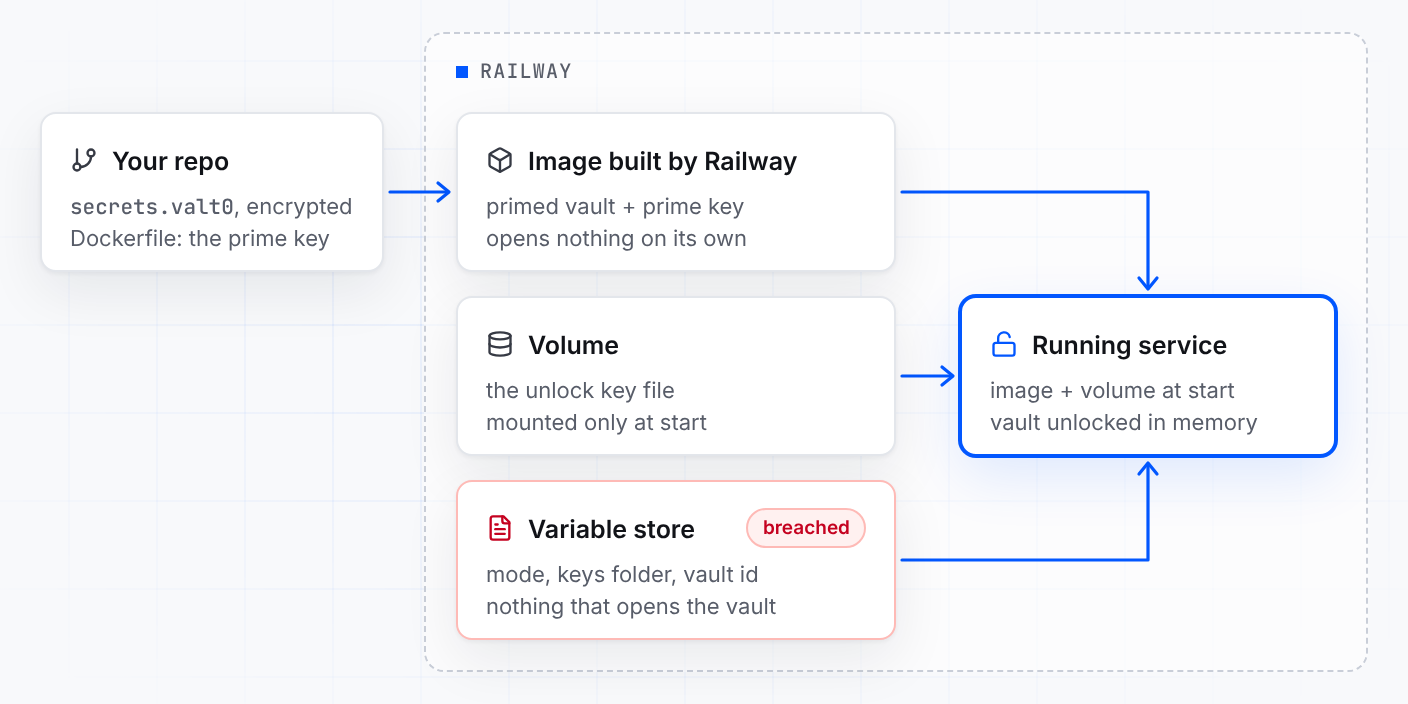
In an app that keeps its secrets in a Valt0 vault, the decrypted variables would have given up a mode, a folder path and a vault id, not your API keys. Opening the vault also takes an unlock key file, which lives on a volume, and nothing Railway has disclosed so far touches volumes.
Valt0 keeps an app's secrets in one encrypted file that ships with the code. In production,
opening it takes two keys, made once on your own machine with
valt0 deploy generate-keys and handed over at different moments (the
deployment guide has the details):
- The prime key, at build time. A line in the Dockerfile primes the vault. The prime key can sit in a build file, because on its own it opens nothing.
- The unlock key file, at run time. It goes on a volume attached to the service, which Railway mounts only when the service starts, never during the build. Once the vault is unlocked, Valt0 removes the primed vault and the prime key from the container's disk and keeps them only in memory, so no other process there can unlock the vault again.
The Dockerfile installs Valt0 and primes the vault:
RUN wget -qO- https://dl.valt0.com/v1/latest/install.sh \
    | sh -s -- --version 1.1.0
COPY secrets.valt0 .
RUN valt0 deploy prime secrets.valt0 VLT0-PRIME-KEY-...
The unlock key file goes onto the volume with Railway's CLI, once. Railway mounts volumes as
root, so an image that runs as another user needs RAILWAY_RUN_UID=0 for Valt0 to
read it:
railway volume files upload ./<unlock-key-file> /<unlock-key-file>
With the volume mounted at /valt0-keys, this is everything left in Railway's
variables. The vault id finds the vault but can't open it:
VALT0_MODE=deploy
VALT0_UNLOCK_KEYS_DIR=/valt0-keys
APP_VAULT_ID=VLT0-ID-...
The app asks for each secret by name. In Python:
import os, valt0
from openai import OpenAI

vault = valt0.open_vault(id=os.environ["APP_VAULT_ID"], name="app")

with vault.secret("OPENAI_API_KEY") as key:
    client = OpenAI(api_key=key.reveal())
print(key) shows [REDACTED], so the value stays out of your logs
too. There are clients for Node.js,
Go and Python.
Read that variable store and you get a mode, a path and an id. The two keys that open the vault are somewhere else: the prime key in your repo's Dockerfile and your image, the unlock key file on a volume.
That doesn't make the incident a non-event. Railway also reset the GitHub tokens it held and the
registry tokens on services, because they may have been exposed, and those reach your repo and
your image: the prime-key half. So the job for a Valt0 app this week is smaller, not zero.
Reconnect GitHub like everyone else, make a new pair of deployment keys with
valt0 deploy generate-keys, put the new unlock key file on the volume, delete the
old one and redeploy. The API keys inside the vault only need rotating if the volume was read
too, and nothing Railway has disclosed says it was.
Rotate today. Then ask what your host's variable store would give up if it were read tomorrow. If the answer is your API keys, Turn an .env file into a vault is the first step, and the deployment guide covers the rest.
Sources: Railway's security disclosure, incident status page, AWS guide, bucket and GitHub reset guide and envelope encryption post; The Hacker News; GitGuardian; BleepingComputer and Zeabur's report; and Railway's docs on variables and volumes.