

Zeabur says an attacker read the names and values of 3,218,965 environment variables stored on its platform, and it is shutting down on 31 December. If you ran anything on Zeabur, every API key, database password and signing key you gave it should be treated as stolen. Revoke them at the source before you move, not after.
Below: what happened, what to rotate and in what order, why a host's variable store is the target, and what the attacker would have read from an app that keeps its secrets out of it.
What happened
Zeabur published a preliminary report on 19 October. In it, Zeabur says an attacker used leaked internal credentials to reach its shared cluster, some dedicated servers and internal systems, and then read the platform database. The report puts the root cause on Zeabur: "long-lived admin credentials were stored in plaintext and could be used from the public internet." One admin token had been created in January 2024 with no expiry. How the attacker got the credentials, Zeabur says, cannot be confirmed yet.
The timeline in the report, in UTC:
- 14 October, 01:36: the attacker first used a Zeabur AWS key.
- 14 October, 12:39: the attacker read the settings and secrets of all services on the shared cluster, environment variables included. Zeabur has confirmed this for the regions with full logs and treats the others as leaked.
- 15 October, 13:56: Zeabur started investigating, after a user report.
- 15 October, 16:10 to 16:47: the attacker read the platform database.
- 15 October, 21:05: the last attacker activity Zeabur has recorded.
The platform database held the service environment variables stored on Zeabur, names and values: 3,218,965 records. Zeabur says the attacker searched environment variables and config files for API keys and private keys, mostly keys that could be used directly, AI service keys above all, though it calls that an observation of intent. Profile data for 321,810 accounts was read too. The attacker also ran commands inside 865 database services and signed in as root on 101 GCP dedicated servers. The investigation is ongoing, and Zeabur says the report will be updated as it finds more.
Zeabur's founder, Yuanlin Lin, announced on 17 October that the company is winding down. Dedicated server renewals stop on 1 December, when shared cluster services are also paused. Everything stops on 31 December. Zeabur has published a migration guide.
What to do now
Zeabur's own advice is to replace every credential in your environment variables, and to revoke the old key with the provider first, then create the new one and redeploy. Do that before you migrate, so the values you carry to the new host aren't ones the attacker already has.
- List what Zeabur held. Go through every project, service and environment. Zeabur also injects variables across services in a project, so a database password may live in more places than the service you set it on.
- Cut off the old value at the source first. Revoke or deactivate the old key at OpenAI, AWS, Stripe or wherever it came from, then make a new one. Changing the value in Zeabur's dashboard does nothing to the copy the attacker holds.
- Change database passwords inside the database. Zeabur's report warns: "Changing environment variables on Zeabur does not change the passwords inside the database." Change them in the database itself. If you ran PostgreSQL on the shared cluster, Zeabur also says to check for roles, functions, triggers, scheduled jobs or extensions you don't recognise, and to rebuild in a new database if in doubt.
- Replace your n8n encryption key. Zeabur found that 602 of the 607 n8n instances it checked set the encryption key in an environment variable, so the credentials stored in n8n were exposed with it. Make a new key and recreate the credentials.
- Start with what the attacker wanted. Zeabur says replace everything; if you need an order, take AI API keys first, then cloud keys, database passwords, payment keys and signing keys.
- Look for use. Zeabur says to review each provider's bills from 14 October on, and from 1 September for GCP dedicated servers. GitHub users should check the audit log for Zeabur GitHub App actions between 15:05 and 18:54 UTC on 15 October.
- Treat GCP dedicated servers as compromised. Zeabur recommends backing up the data and rebuilding the server, and replacing every credential on it. On Hetzner and DigitalOcean servers, check the provider's console for root password resets or reinstalls after 14 October.
Why the variable store is the target
A host that injects your secrets as environment variables has to keep them in a form it can hand to your app in plain text, every time a service starts. So the platform holds all of them, readable by the platform. At Zeabur the attacker read them twice: from the shared cluster's service settings on 14 October, and from the platform database, in 37 minutes, on 15 October.
Zeabur's report also says the attacker went looking for keys that pay off straight away. AI keys do: someone else runs models and you get the bill. Whatever you deployed, the useful part of it for the attacker was in the variables.
That is why the migration matters as much as the rotation. Zeabur's migration guide tells you to carry the actual values of the variables Zeabur injected across services over to your new platform, because missing ones break the app. If they go into the next host's variable store, you have rebuilt the same target somewhere else, with fresh keys in it.
What the database read would have found in a Valt0 app
In an app that keeps its secrets in a Valt0 vault, the variables Zeabur stored would have been a mode, a folder path and a vault id. Those would have been three of the 3,218,965 records, and a search of them for API keys would have found none.
Valt0 keeps an app's secrets in one encrypted file that ships with the code. Without its key the
file can't be read. Your existing .env
becomes a vault in one command (more on that here):
valt0 convert .env --output prod
valt0 deploy generate-keys prod.valt0
The second command, run once on your own machine, makes the two keys a deployment needs, handed over at different moments (the deployment guide has the details):
- The prime key, at build time. A line in the Dockerfile primes the vault. The prime key can sit in a build file, because on its own it opens nothing.
- The unlock key file, at run time. It goes on a volume the service mounts when it starts, never in the repo or the image. Once the vault is unlocked, Valt0 tries to delete the primed vault and the prime key from the container's disk and keeps them only in memory, which makes them harder to take.
RUN wget -qO- https://dl.valt0.com/v1/latest/install.sh \
    | sh -s -- --version 1.1.0
COPY prod.valt0 .
RUN valt0 deploy prime prod.valt0 VLT0-PRIME-KEY-...
With the volume mounted at /valt0-keys, this is all that goes in the host's
variables, on Zeabur or wherever you move:
VALT0_MODE=deploy
VALT0_UNLOCK_KEYS_DIR=/valt0-keys
APP_VAULT_ID=VLT0-ID-...
The app asks for each secret by name. In Node.js:
import { openVault } from '@valt0/client';
import OpenAI from 'openai';

const vault = await openVault({ id: process.env.APP_VAULT_ID!, name: 'prod' });

const key = await vault.secret('OPENAI_API_KEY');
const openai = new OpenAI({ apiKey: key.reveal() });

console.log(key); // Secret([REDACTED])
A Secret prints as [REDACTED] in logs, JSON and stack traces, so the
value stays out of your logs too. There are clients for
Node.js, Go and
Python.
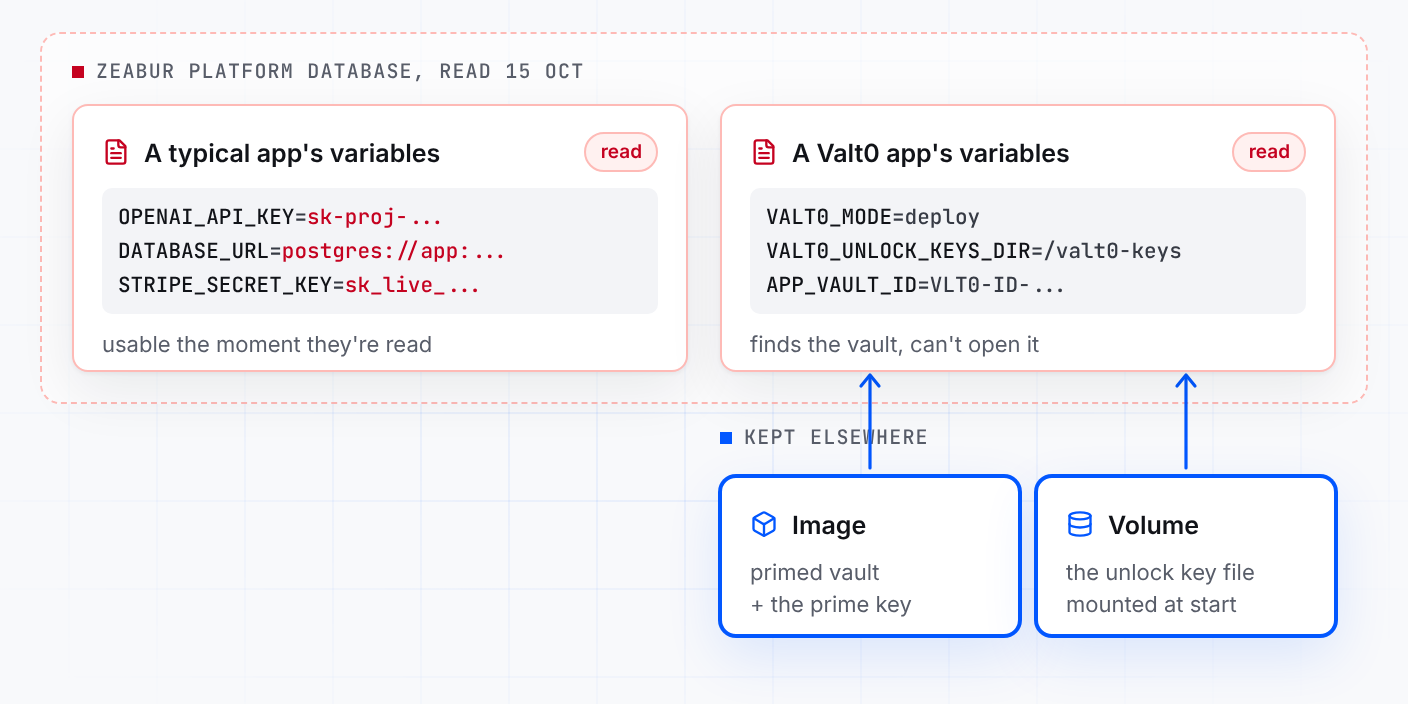
Read the platform database and you get a mode, a path and an id. The prime key is in your repo and your image, the unlock key file is on a volume, and opening the vault takes both.
A Valt0 app on Zeabur would still have work to do this week. Zeabur's report says its cluster
admin tokens can run commands in any container, and the attacker held them, so rotate the
secrets inside the vault along with everyone else. Then, when you move, make a new pair of
deployment keys with valt0 deploy generate-keys, put the new unlock key file on the
new host's volume and leave the old one behind.
You have until 31 December to move, and today to rotate. When you set up the new host, start with Turn an .env file into a vault, then the deployment guide.
Sources: Zeabur's preliminary incident report, shutdown announcement, migration guide and status page; BleepingComputer; and Valt0's deployment guide and Node.js client docs.